
Find requirements with no linked tests.
Requirements traceability in Jira
Connect Jira requirements to tests, results and defects
A linked test is a starting point. Nexus requirements traceability helps you follow the requirement through the tests that check it, the results they produced and the defects that remain open.
Requirement-to-test coverageExecution and defect evidenceTraceability reports and exports
How it works
Separate a test link from evidence of a result
A requirement can have a test case without having a recent passing result. It can also have a passing test while another relevant case is blocked or failing. A coverage review needs to distinguish these situations instead of treating the number of linked cases as proof that a feature is ready.
The Nexus Coverage page shows requirements, coverage state, linked tests, latest outcomes and open defects. Open a requirement row to inspect the evidence behind its status. This gives a QA lead a practical next action: create a missing case, investigate a failure or arrange another run.
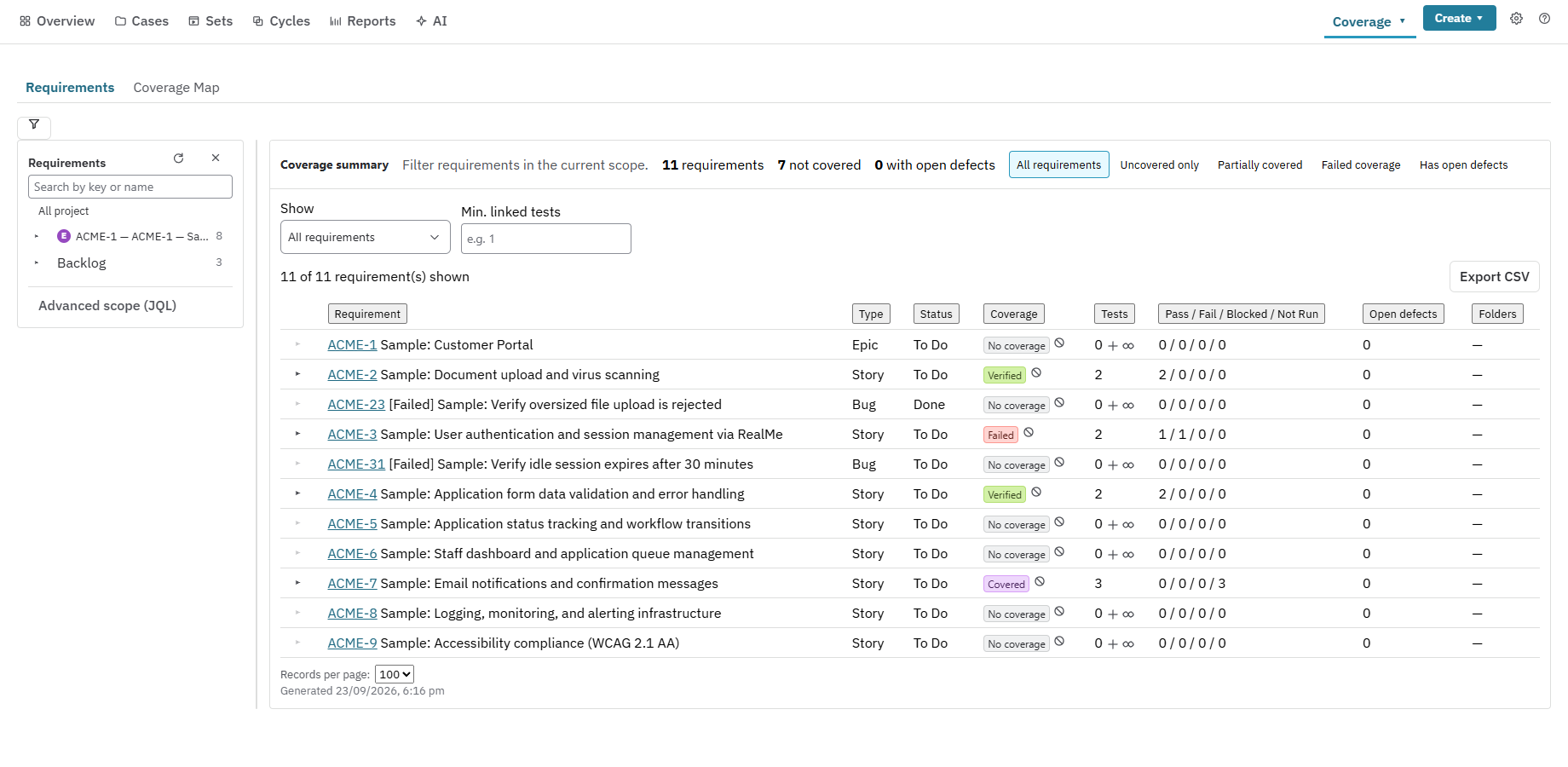
Inspect failed, blocked or partial coverage.
Follow a requirement to its cases and latest results.
Open linked Jira Bugs to understand the remaining defect work.
Implementation guide
Review the right sprint or release scope
Traceability is useful when its scope matches the decision being made. Before a sprint review, inspect that sprint. Before a release, inspect the relevant Fix Version or a saved JQL-defined set of requirements. A project-wide total can hide a gap in the small set of features being delivered today.
Use the Requirements view for investigation and Coverage Map for a broader relationship view. Agree which requirement types and links represent the team’s intended scope. Explicit scope makes a report easier to reproduce and explains why a requirement was included or excluded.
Choose the sprint, release or JQL-defined scope before reviewing totals.
Use Uncovered only to focus on missing test links.
Investigate the evidence behind a status instead of relying on colour alone.
Record exceptions and the work required to resolve them before sign-off.
Implementation guide
Share a traceability matrix and the supporting detail
Different readers need different levels of evidence. A requirement owner may need a summary, while a release reviewer needs to follow a particular requirement through its tests and results. Nexus Reports includes traceability summary, detail, matrix and defect traceability, alongside coverage by sprint or Fix Version.
Most reports export to CSV or Excel and can be published to Confluence. Saved views support repeatable reviews; Jira dashboard gadgets provide an operational view between formal checkpoints. Viewers still need access to the underlying Jira work, so a shared report remains part of the project’s permission model.
Use the matrix to review requirements and their coverage together.
Use detail when a reviewer needs an audit table per requirement.
Use defect traceability to follow the run that found a Jira Bug.
Save a named view and share only the scope and evidence the audience needs.
Implementation guide
Run a traceability pilot before expanding the library
Start with a handful of Stories or Epics and link representative cases to them. Include a requirement with no test, one with a passing result and one with a failed run and a linked Bug. These examples let reviewers check whether the reporting matches the underlying Jira evidence.
Use the same pilot for manual and automated results. Where automation matches by Automation Key, check the mapping on the first imported run. Review changes to the requirement and decide which tests need another execution rather than assuming an older result still proves the revised behaviour.
Create a small, known set of requirements and cases.
Record manual outcomes and ingest a representative automated result.
Compare Coverage and the traceability report with the underlying records.
Agree how the team reviews changed requirements and coverage exceptions.
Questions buyers ask
Frequently asked questions
What is a requirements traceability matrix?
It is a view connecting requirements to the tests and evidence that support them. Nexus provides a matrix report alongside summary and detailed requirement traceability views.
Does a linked test mean a requirement has passed?
No. A link establishes a relationship. Review the test outcomes, scope, environment context and unresolved defects before making a readiness decision.
Can I track both manual and automated results?
Yes. Manual runs and ingested automation results use the Nexus execution and coverage model. Check the automation mapping so each result reaches its intended case.
Can I export coverage evidence?
Most Nexus reports support CSV or Excel export and publication to Confluence. Choose the report and scope that answer your reviewer’s question.
Test the workflow with a real Jira project
Start with one requirement, one cycle and one release decision.