
Choose one requirement or feature with a clearly defined start and outcome.
Model-based testing in Jira
Model-based testing for Jira workflows and business rules
Make the behaviour visible before writing the cases. Nexus model-based testing turns state-machine routes and decision-table rules into ordinary Jira Test Cases, without requiring an AI account.
State machines and decision tablesOrdinary Jira Test CasesNo AI account required
How it works
Use a state machine for a workflow
A workflow has states, actions and permitted transitions. Drawing those relationships helps a tester identify paths that a list of happy-path steps can overlook. For example, an approval process may allow submission, rejection, revision and resubmission; the return paths deserve attention as well as the first successful approval.
In the Nexus MBT editor, model the behaviour and generate routes as test cases. Review the resulting steps and expected results before using the cases in a cycle. The model is a design aid: a route becomes useful evidence only after its test has been executed against the application.
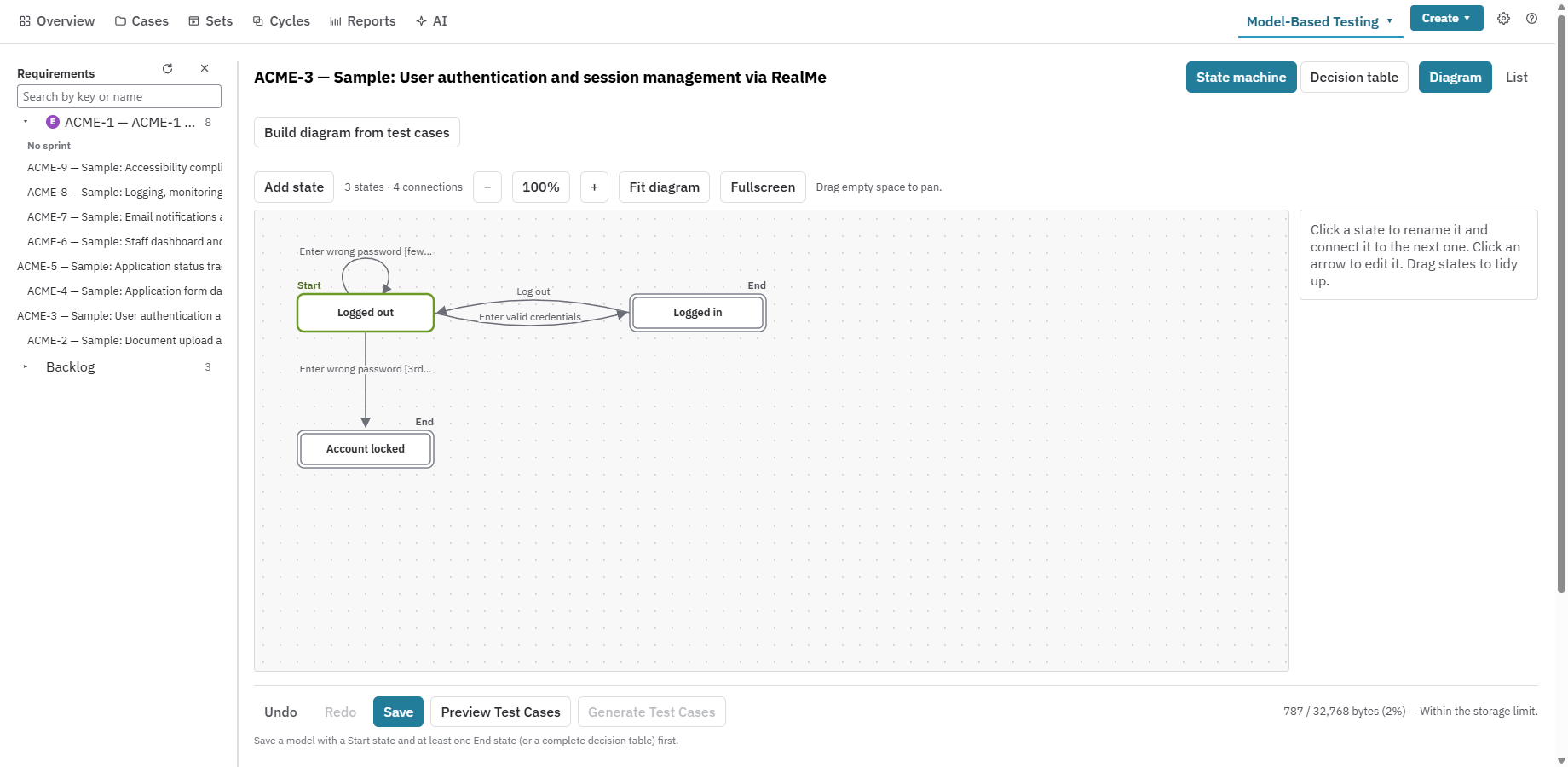
Name states in business language, then connect them with meaningful actions.
Check alternate and return paths with the people who understand the workflow.
Generate cases, inspect their content and use the normal Jira test execution workflow.
Implementation guide
Use a decision table for business rules
A decision table is a better starting point when outcomes depend on combinations of conditions. Eligibility, permissions or approval thresholds can be reviewed as conditions and expected actions rather than as a long sequence of unrelated examples.
Enter the rules and their outcomes, check them with a business reviewer, then generate the corresponding cases. This creates a reviewable connection between a rule and the scenario that tests it. Keep the table focused: split unrelated decisions into separate models so a reviewer can explain each rule.
Identify which conditions change the outcome.
Write the expected action for each rule that needs testing.
Inspect missing or contradictory combinations before generating cases.
Link the resulting tests to the Jira requirement that defines the rule.
Implementation guide
Combine workflow paths with input checks
A state model describes how behaviour changes, but it does not replace every other test technique. Some defects sit at the edge of an allowed range rather than on a workflow path. Include explicit test inputs and expected results in the generated cases when the workflow depends on amounts, dates or eligibility values.
For example, an approval route might behave differently just below and just above a limit. Review these examples with the requirement owner and supplement the model-generated set with ordinary cases where necessary. Keeping the scope clear helps the reviewer distinguish path coverage from the separate question of which inputs were checked.
Check below, at and above a limit when the requirement defines one.
Include representative valid and invalid inputs.
Review the generated steps and expected results before execution.
Add ordinary Test Cases for checks outside the chosen model.
Implementation guide
Evaluate a model with one real feature
Enable MBT for the pilot project and start with a feature whose behaviour the team can explain. Compare the generated cases with the existing test set: look for overlooked transitions, duplicated scenarios and rules that were never written down.
After execution, use Coverage to inspect the requirement and its test outcomes. A model does not demonstrate complete coverage of an application; it helps make the chosen behaviour and its checks explicit. When the requirement changes, review the model, affected cases and execution evidence together.
Agree the scope and exclusions with the requirement owner.
Review the model before generating a large case set.
Execute a small representative cycle and investigate a failed scenario.
Keep the reviewed tests connected to requirements and release evidence.
Questions buyers ask
Frequently asked questions
What is model-based testing in Jira?
It is test design from an explicit behaviour model. Nexus provides state machines and decision tables inside its Jira Cloud workflow, then turns the selected routes and rules into Test Cases.
Does Nexus MBT require AI?
No. State-machine and decision-table generation work without AI. AI-assisted parameter suggestions are optional and require a configured provider account.
Can model-based cases be executed manually?
Yes. Generated cases are ordinary Nexus Test Cases and can be included in a manual test cycle. They do not automatically become executable browser scripts.
When should I use a model instead of AI generation?
Use a model when paths or rule combinations are the key design problem. AI generation starts from requirement text and produces editable drafts. Both still need human review.
Test the workflow with a real Jira project
Start with one requirement, one cycle and one release decision.