
Spot likely personal data
The dataset scanner flags patterns such as email addresses, card numbers and New Zealand phone, IRD, NHI and bank-account details. Findings help your team review and classify data before publishing it.
Analyse a requirement when useful or generate test drafts directly. Review every finding and draft before it becomes part of the Jira record.
Get started →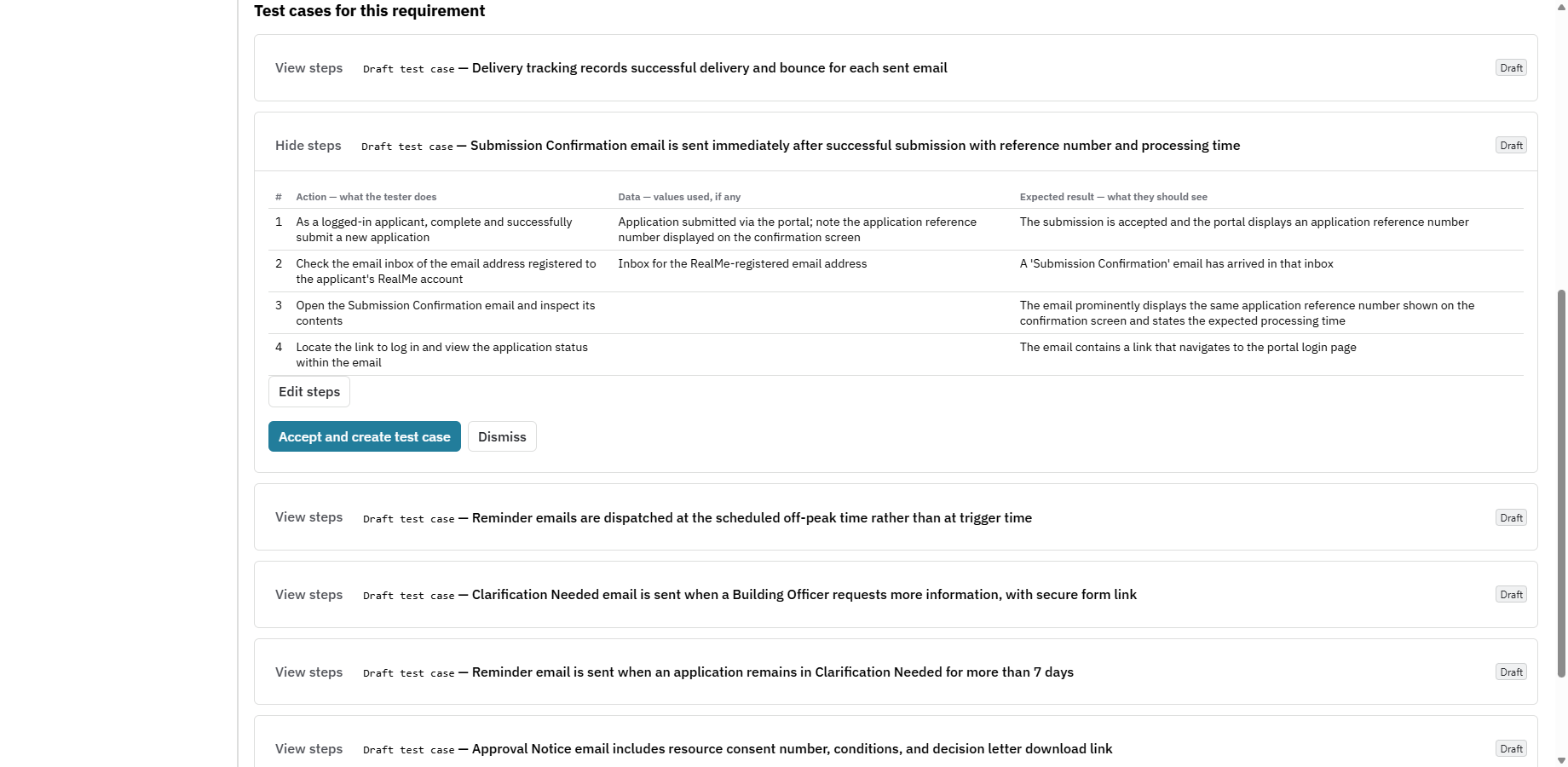
Connected intelligence
Nexus Pro connects to your own AI account. Choose a supported provider and model centrally in Nexus Setup.


Your account, your usage. Model usage is billed by your provider. Nexus reports token usage and keeps test drafts under human review.
Rovo has its own connection. The Nexus analyst runs through Atlassian Rovo and your Jira permissions. Explore Rovo support →
PII & sensitive-data protection
Nexus combines personal-data scanning, sensitive-value masking and rules for which dataset rows can become AI examples. Review requirements and test-case content before sharing it with your chosen AI provider.
Explore test data controls →Only synthetic rows can be included as examples, and only when you choose to include them.
The dataset scanner flags patterns such as email addresses, card numbers and New Zealand phone, IRD, NHI and bank-account details. Findings help your team review and classify data before publishing it.
Sensitive datasets show masked values by default. Owner and owner-group controls govern explicit reveals, with reveal activity recorded. A masked dataset means identifiers have already been replaced; choosing that classification does not anonymise the data for you.
For AI test-data suggestions, existing rows are optional. Only rows classified as synthetic can be used as examples, with a maximum of five. Masked and sensitive rows are excluded even when examples are requested.
01 / Optional requirement review
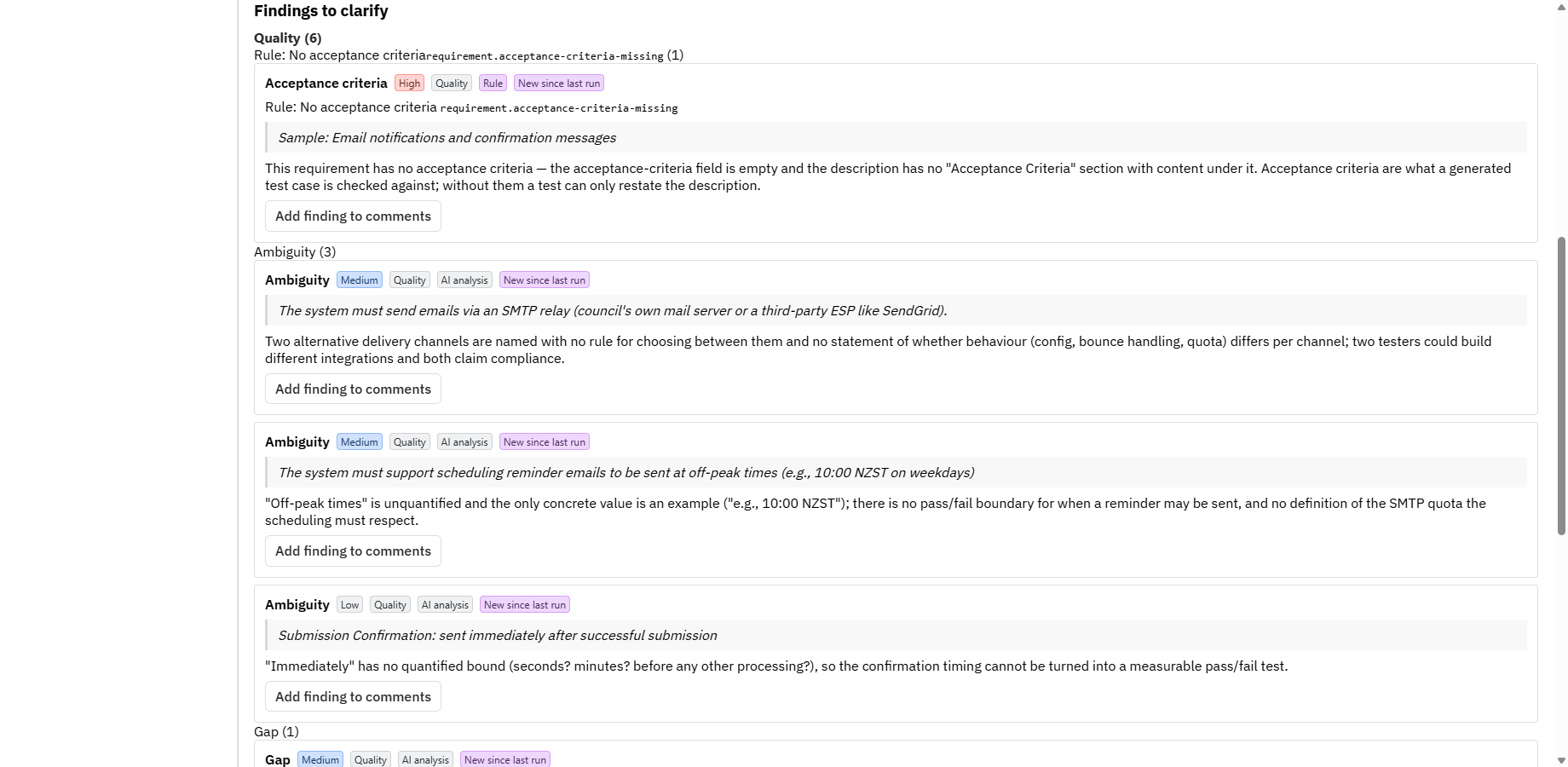
When analysis is useful, review requirements for ambiguity, gaps, contradictions and weak acceptance criteria. Findings point back to the requirement so your team can investigate the evidence and decide what needs clarification.
Analysis is optional; it is not a gate before test generation. Keep useful findings, correct assumptions and dismiss suggestions that do not apply.
02 / Test case creation
Generate traced test-case drafts directly from a requirement. Approved findings can inform the draft when they are available, and your team reviews every proposal before deciding which cases belong in the test library.
Inspect the suggested scenarios, requirement links, actions and expected results. Check that the tests prove the behaviour your team intended.
Correct the draft, accept useful tests and dismiss irrelevant suggestions. Generating a draft is separate from accepting it as a Jira test case.
Accepted cases become part of your Jira test library, ready for planning and execution. An AI-generated case is a design, not evidence that the behaviour passed.
03 / Model-based testing
Use state machines and decision tables to express the behaviour your tests need to cover. Review the model, refine its rules and generate test cases from the saved structure.
Describe states and transitions, or map conditions to expected actions in a decision table.
Check the paths, conditions and outcomes before saving the model.
Use the saved model to generate test cases. The model rules drive repeatable generation.
Model-based generation is deterministic and works without an AI provider account.
Explore the connected workflow04 / Test data assistance
Use AI to help prepare the data your test cases need, with a review step before applying suggestions.
Propose data columns and scenario rows, or find data written into steps and suggest reusable placeholders. Review, edit or reject suggestions before applying them to a dataset or step.
Masked or sensitive dataset rows are not sent as examples.
Explore test data →05 / Rovo support
Use Atlassian Rovo as another entry point to Nexus. The agent works within your Jira permissions, so answers reflect the work you can access.
Rovo must be available and enabled for your Atlassian site. Its availability is separate from the AI provider account connected to Nexus Pro.
Ask about your testing evidence
06 / Token and usage management
Connect your own provider account and monitor recorded AI usage in tokens. Nexus brings model configuration and recorded usage together for administrators to review.
View recorded input and output tokens, run counts and monthly history. Project breakdowns help administrators understand where usage comes from.
Configure a site-wide monthly token threshold and sudden-usage-spike alerts. Warnings appear in Nexus for administrators to review and dismiss.
Manage the provider and model centrally. Turn AI off for the site when it should not be used.
Choose the model's thinking level where supported, balancing reasoning depth, response time and token use.
They do not stop or slow AI runs. Nexus reports tokens, not a currency bill, and does not impose its own AI usage cap. Your provider bills model usage separately from the Nexus subscription; manage provider-side budgets and limits in that account.
Your provider. Your decisions.
A Jira administrator connects Anthropic, OpenAI, Google Gemini, Moonshot Kimi or xAI Grok for the site. The provider key stays in Forge secret storage, not in the browser.
Core test management and deterministic MBT work without Pro AI features. AI output remains subject to human review and is not a release sign-off.