Evidence goes stale
A pass can outlive the deployment it proved. Without environment context, yesterday's result can look current today.
From requirements and test cases
to a release decision you can explain.
Nexus brings manual testing, AI-assisted test design, automation, test data and environment management into your Jira workflow. Follow the evidence from requirement to sign-off.
 Nexus / Requirement coverageActual product · Sample project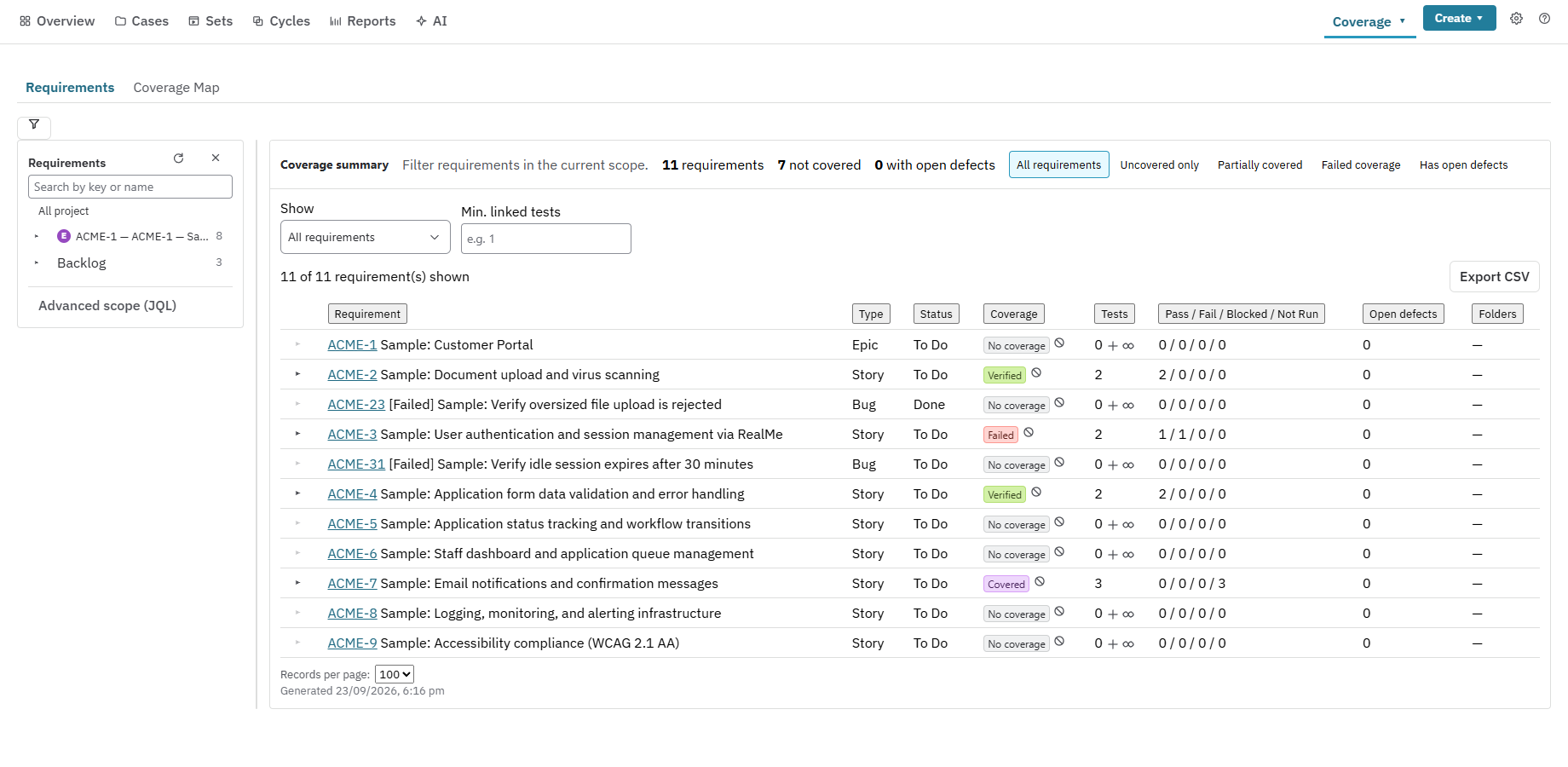
The release problem
Release decisions become fragile when results are separated from the build, environment, requirement and data that produced them.
A pass can outlive the deployment it proved. Without environment context, yesterday's result can look current today.
Shared spreadsheets and mutable datasets make failures hard to reproduce and sign-offs hard to defend.
Coverage, defects, automation and approvals live in different places, leaving release owners to assemble the story by hand.
The Nexus difference
Nexus connects what changed, what was tested, where it ran, which data it used and why the team approved the release, on top of the connected core of planning, execution and traceability.
Results are tied to builds and environments, with stale evidence surfaced before sign-off.
Versioned, classified and reserved test data remains connected to the execution that used it.
AI suggests; your team reviews, edits and accepts. Release approval always remains a human action.
Security boundaries by architecture
Supporting app data stays on Atlassian Forge. Nexus does not copy your Jira project into a separate Resync database.
Test Cases, Test Sets and Test Executions remain Jira issues, using the permissions, links and workflows your team already governs.
See storage, permissions and processing boundaries →Core test artefacts use the Jira issues, permissions, links and workflows your team already governs.
Runs, datasets, environments and audit records use Atlassian-operated Forge storage.
AI, CI dispatch and direct migration connections run only when an administrator configures and uses them. Their boundaries are disclosed rather than hidden behind a universal zero-egress claim.
How Nexus works
Nexus keeps the short path visible while the full release audit trail stays attached underneath.
Beyond a test repository
These are not decorative dashboards. Each capability closes a gap between a test result and a defensible release.
Know when a deployment or change makes a previous result stale and requires a re-run.
Release readiness →Version, classify and reserve data, then trace every execution to the inputs it used.
Test data controls →Use your organisation's provider and review editable findings and test drafts before accepting them.
AI and human review →Use CSV tools and mapping presets, or administrator-configured direct connections for supported source tools.
Plan a migration →Bring gates, Quality Score and attention items together before recording go or no-go.
See the decision view →Nexus AI · AI-assisted test design
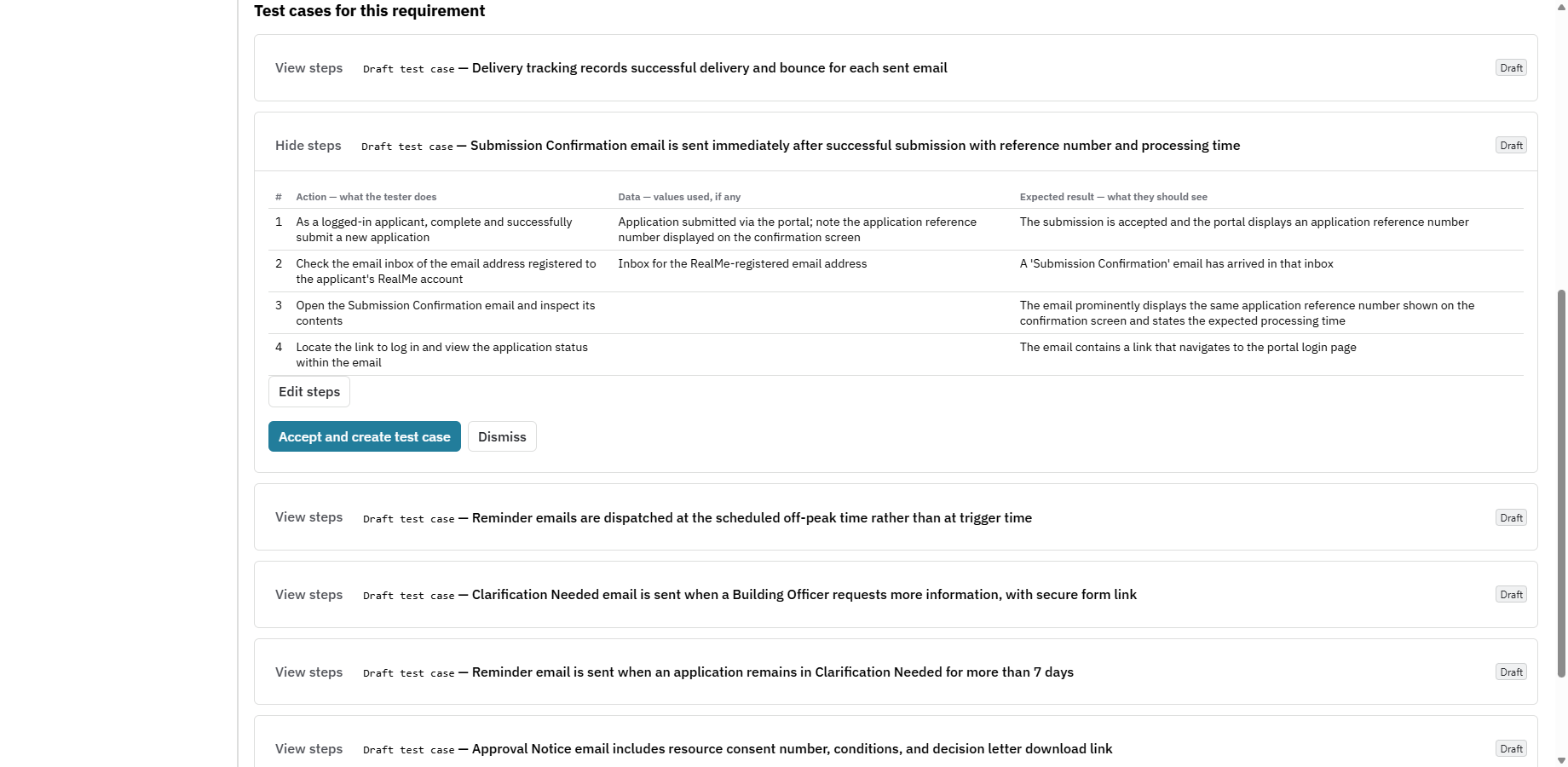
Generate structured, editable tests from a Jira requirement without starting from a blank page. Requirement analysis is optional, and every proposed test remains a draft until a person reviews and accepts it.
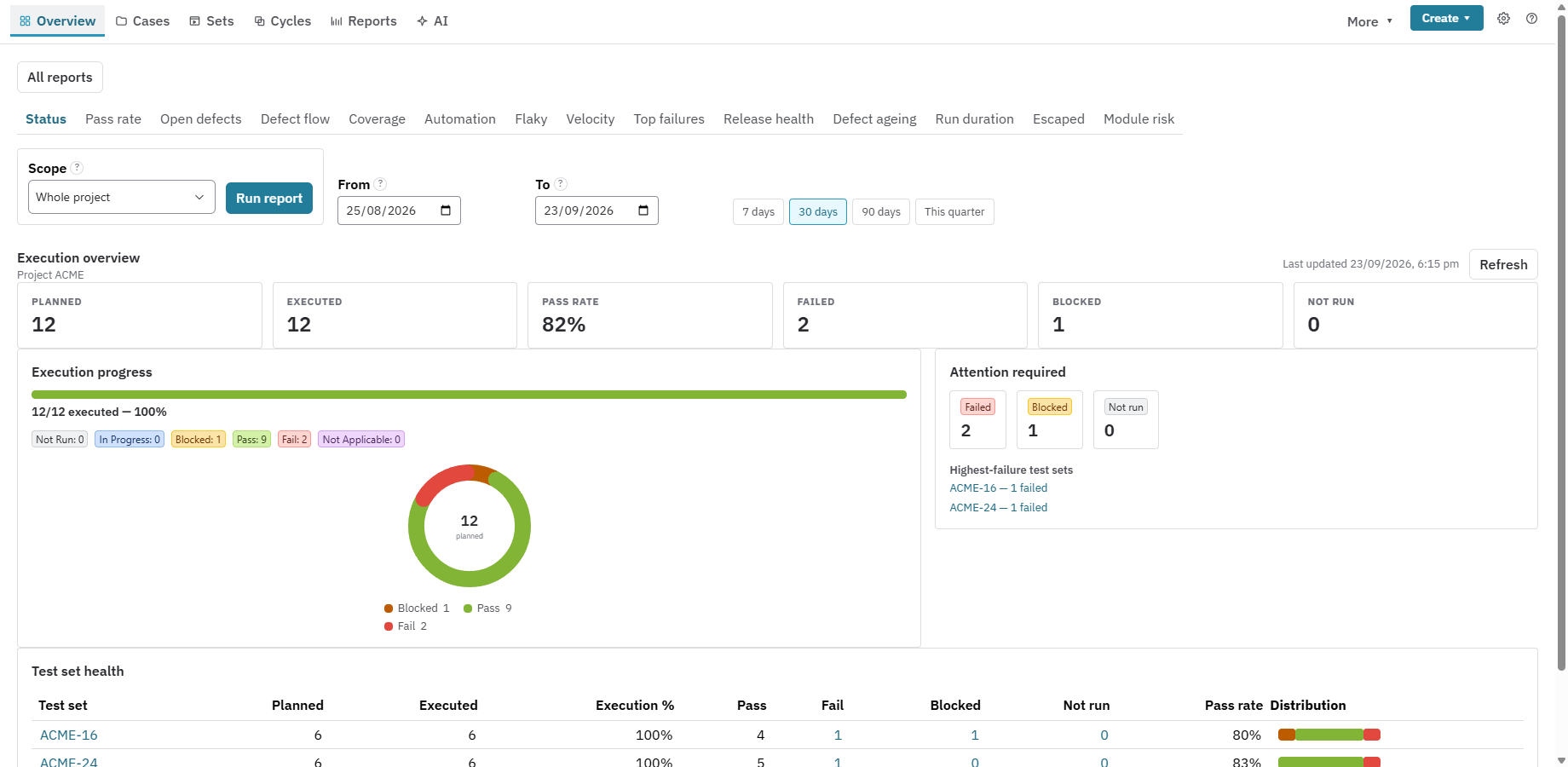
Product proof
These are real Nexus product screens using a sample Jira project. No invented customer quotes or vanity metrics.
The tools behind the evidence
Keep your existing automation tools and connect the results to the work they prove.
Run in CI starts GitHub Actions, GitLab.com, Azure DevOps Pipelines or Bitbucket Pipelines. Results return to the same cycle.
Set up Run in CI →Use Playwright, Selenium with pytest, Cypress, Cucumber, JUnit, Mocha or Robot Framework. Match results by Automation Key or issue key and raise linked Bugs from failures.
Find your integration →Give a project key the separate Read test data permission. Read paged cases, cycles, runs, step results and coverage, with sensitive values masked.
Explore the read-only API →Direct browser reads for repository and test case Jira data reduce server-side Jira API calls and speed up key views.
See the measured improvements →Add bold, italic, code, lists and links to steps, preconditions and free-text cases. Use the toolbar and preview; existing plain cases stay plain until formatting is enabled.
Read the product guide →Export folders as CSV, JSON, Excel or Cucumber .feature files. Round-trip sets and cycles as JSON, preview imports and undo them.
Explore import and export →Use executedBy, runsWithStatus, testsInSet and requirementsWithoutTests. Search custom run statuses and requirements with no tests.
See the search functions →What's new · October 2026
Recent releases add guided execution, reusable steps and branches to the testing flow, and faster reporting to the release view. Some quality-intelligence features are rolling out in stages.
Start or resume testing from a cycle or My tests. Save a result and move to the next test without leaving the run. Your place is remembered per cycle.
See the workflow →My Testing ranks your next actions across execution, review and failures. Quick View drawers show runs, cases, defects and requirements without losing your place.
Explore the Jira app →Insert shared steps into any case, update everywhere with an impact preview, or detach. Typed step fields cover dates, radio buttons, multi-select and people.
Read the product guide →Edit and run a version of a test beside the default one, compare side by side, then promote it to Main with a recorded reason and conflict check.
Explore the Jira app →Plans carry status, comments, links, change history and admin-defined fields. Dynamic plans pick members by rule and can start a cycle from one generation. Sprint readiness shows stories, results and open defects.
Release readiness →Store a Playwright script on a Test Case with versions, review and approval. The customer-hosted runner picks up approved scripts and verifies a checksum. Locator repairs are suggested for review, never applied silently.
Nexus Recorder →Compare and push Cucumber .feature files from your repository. The Nexus API serves cases, sets, plans, runs, versions, data sets and scripts with scoped keys and a request log.
Explore the API →A single definition of pass rate, flaky tests and coverage runs through every screen. Reports answer faster for large projects and Platform health shows queue backlog and running jobs. Release forecast and the Quality Executive Summary sit beside Can we release.
See the decision view →Test ownership, test debt and an advisory Test health score separate from the requirement Quality Score. Failure categories and regression-set suggestions are advisory and need a person to confirm. Rolling out in stages.
Why Nexus →Choose a five-area Compact or Expanded navigation, search with Ctrl/Cmd+K and pin the pages you use most. Help is a click away on every term.
Read the FAQ →How to start
Start small, keep your current execution tools and move only when the evidence works for your team.
Plan, execute, automate and trace testing in Jira with governed data and decision-ready reporting.
Use one representative cycle to assess environments, current evidence, gates, Quality Score and sign-off.
Map, pilot and reconcile an existing library before a wider cutover.
Questions before you start
Nexus includes every feature. Atlassian Marketplace will publish the current price and calculate it from your Jira user tier. Marketplace also manages the licence, billing and free trial.
Core test artefacts are Jira issues. Supporting records use Atlassian Forge storage, and Nexus does not use a separate Resync application backend. Read the trust and security overview.
It depends on the source data and custom fields. Start with an inventory, map a representative sample, run a pilot and reconcile the result before cutover. Nexus provides CSV tools and presets for common Jira test-management formats.
AI is optional and included. Your Jira administrator connects your organisation's supported provider account, keys stay in Forge secret storage, and generated findings or tests remain drafts until a person accepts them. Your provider agreement governs its processing. Read the privacy policy.